A Windows security update released in January and now fully enforced this month is causing Windows users to experience 0x0000011b errors when printing to network printers.
In January 2021, Microsoft released a security update to fix a 'Windows Print Spooler Spoofing Vulnerability' tracked as CVE-2021-1678.
"A security bypass vulnerability exists in the way the Printer Remote Procedure Call (RPC) binding handles authentication for the remote Winspool interface," explains a support bulletin about the vulnerability.
When the security update was released, it did not automatically protect devices from the vulnerability. However, it did add a new Registry key that admins could use to increase the RPC authentication level used for network printing to mitigate the vulnerability.
In other words, this security update did not fix any vulnerability unless a Windows administrator created the following Registry key:
[HKEY_LOCAL_MACHINE\System\CurrentControlSet\Control\Print]
"RpcAuthnLevelPrivacyEnabled"=dword:00000001
However, in this month's September 14th Patch Tuesday security updates, Microsoft automatically enabled this setting by default for every Windows device even if that Registry setting was not created.
Once this mitigation was enabled by default, Windows users began experiencing 0x0000011b errors when printing to network printers.
This printing error is mainly seen in small business and home networks that can't take advantage of a Kerberos setup on a Windows domain.
Uninstalling September's Windows security updates will fix the problem, but now the devices will be vulnerable to two vulnerabilities, PrintNightmare and MSHTML, actively exploited by threat actors.
A better method is to disable the mitigation for CVE-2021-1678 until Microsoft comes out with new guidance, as that vulnerability is not actively exploited.
How to fix the 0x0000011b printing errors
To fix the recent 0x0000011b printing errors without removing the current Windows Updates (KB5005565), you can instead disable the CVE-2021-1678 mitigation enabled by default this month.
To do that, open the Windows Registry Editor and navigate to the HKEY_LOCAL_MACHINE\System\CurrentControlSet\Control\Print key, create a new DWORD-32 bit value named RpcAuthnLevelPrivacyEnabled, and set it to 0, as shown in the Registry file below.
Windows Registry Editor Version 5.00
[HKEY_LOCAL_MACHINE\System\CurrentControlSet\Control\Print]
"RpcAuthnLevelPrivacyEnabled"=dword:00000000
To make it easier to add this change, you can use the fix-0x0000011b.reg Registry file to add it for you.
Download this file on both your print server and your Windows devices connecting to it, double-click on it, and allow the data to be merged.
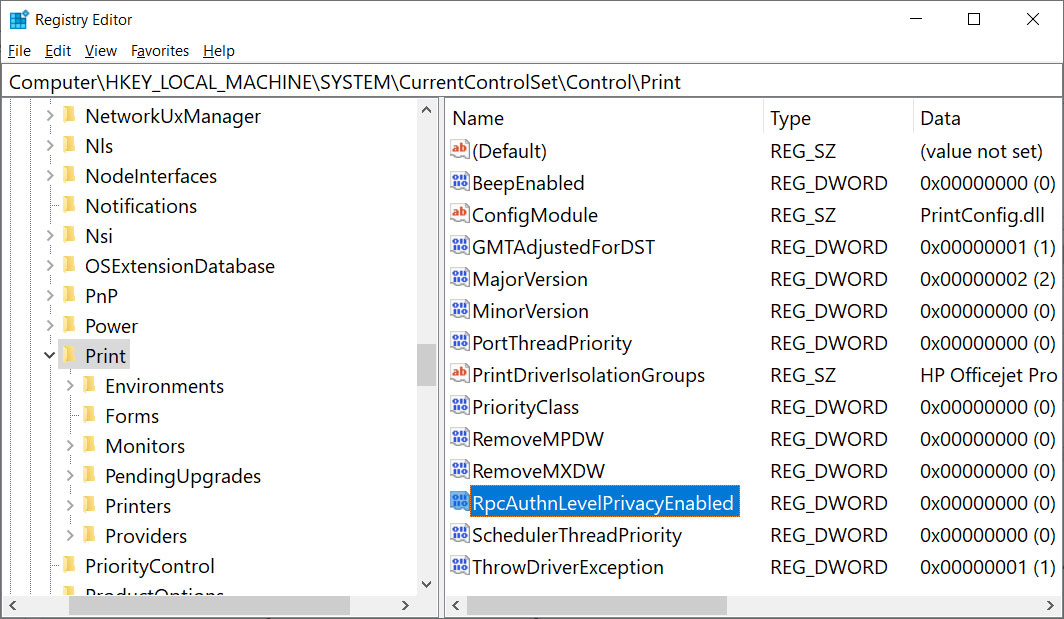
Once you disable this mitigation, you will no longer be protected from the vulnerability, but it will hopefully allow you to print again.
If this does not solve your problem, use the enable-RpcAuthnLevel.reg to go back to the Windows defaults.
fonte original: https://www.bleepingcomputer.com/news/microsoft/how-to-fix-the-windows-0x0000011b-network-printing-error/


